




Uley is a specialized container management platform designed for companies that sell, lease, and store shipping containers. The system combines financial deal management, complete container history tracking, and terminal rate monitoring within a single interface.
In this guide, we’ll show how Uley works in real business scenarios—from managing your container list to reviewing individual deal details. (Uley - a product from Lemnos, which is a partner of My Way Shipping)
Main Dashboard: Container Fleet Management
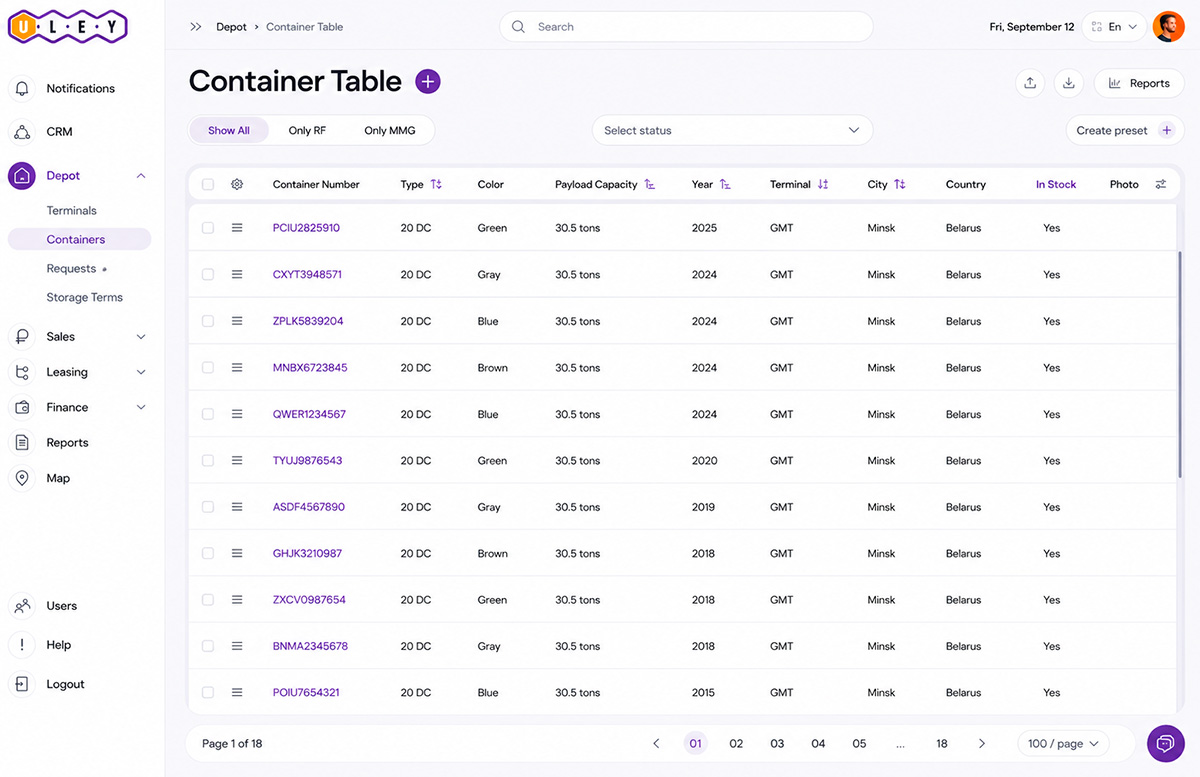
The main dashboard displays the complete list of your containers, serving as the primary workspace for daily operations.
Key Features
Customizable Columns
Configure which columns are displayed based on your workflow using the Field Settings button.Advanced Filtering
Quickly filter containers by multiple parameters, including:
● Terminal (e.g., Novaya Pyshma, STL, Vnukovo)
● Status (Storage, Repair, In Transit)
● Owner
● Release status
● And many other criteria
Essential Container Information
The dashboard displays all critical container information, including:
● Container type
● Payload capacity
● Terminal rate
● Price
● Booking manager
● Deal number
Container Card: Deal History and Current Status
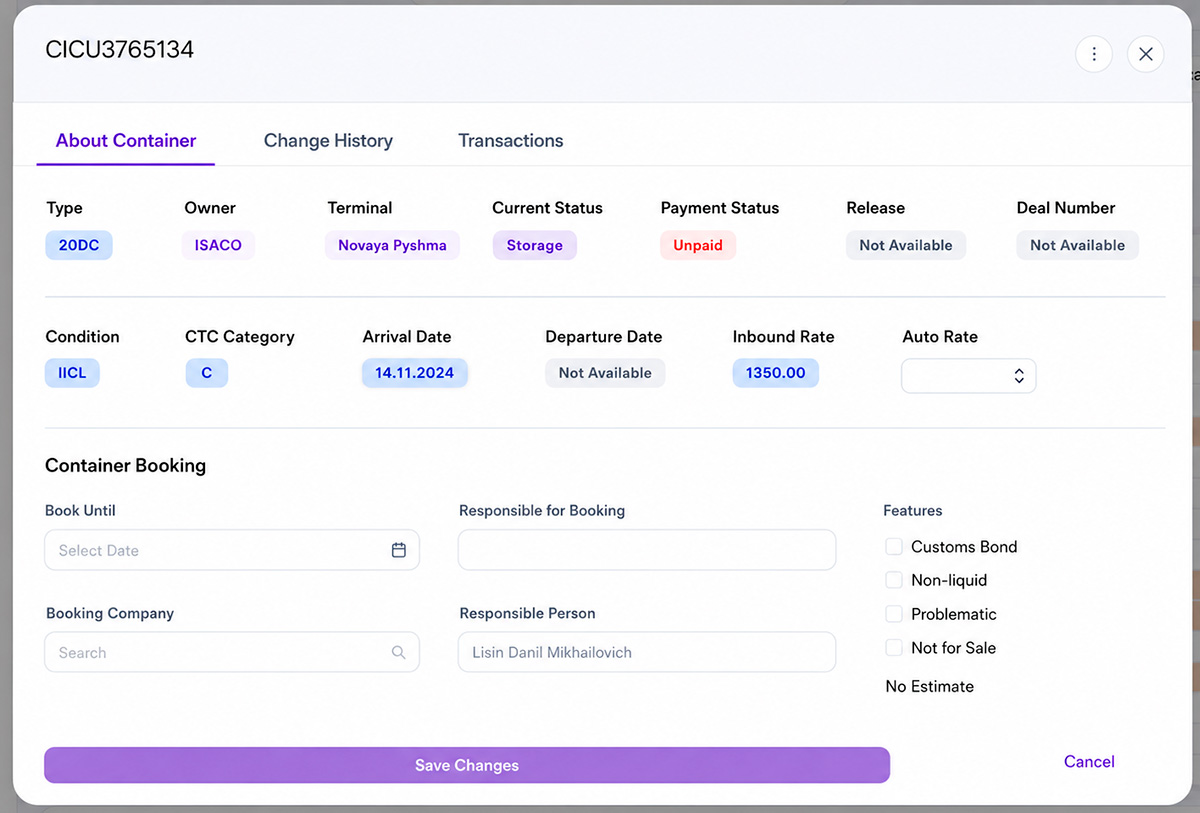
Clicking on a container number (for example, CICU3765134) opens its detailed container profile with multiple information tabs.
Container Information
The container profile includes:
● Container type
● Owner (for example, ISACO)
● Current terminal
● Current status (Storage)
You’ll also see:
● Payment status (Paid / Unpaid)
● Release status (Available / Not Available)
● Linked deal number if the container is currently assigned to a transaction
KTK Booking Information
This section contains:
● Booking expiration date
● Broker company
● Responsible employee
Custom checkboxes can also be configured for internal workflows, including:
● Customs Declaration
● Non-liquid Asset
● Problematic Container
● Not for Sale
These attributes are fully customizable.
Condition & Terminal Rates
Here you’ll find:
● IICL condition grade
● Arrival and departure dates
● Current incoming terminal rate
The incoming terminal rate is displayed both in the container profile and in the change history.
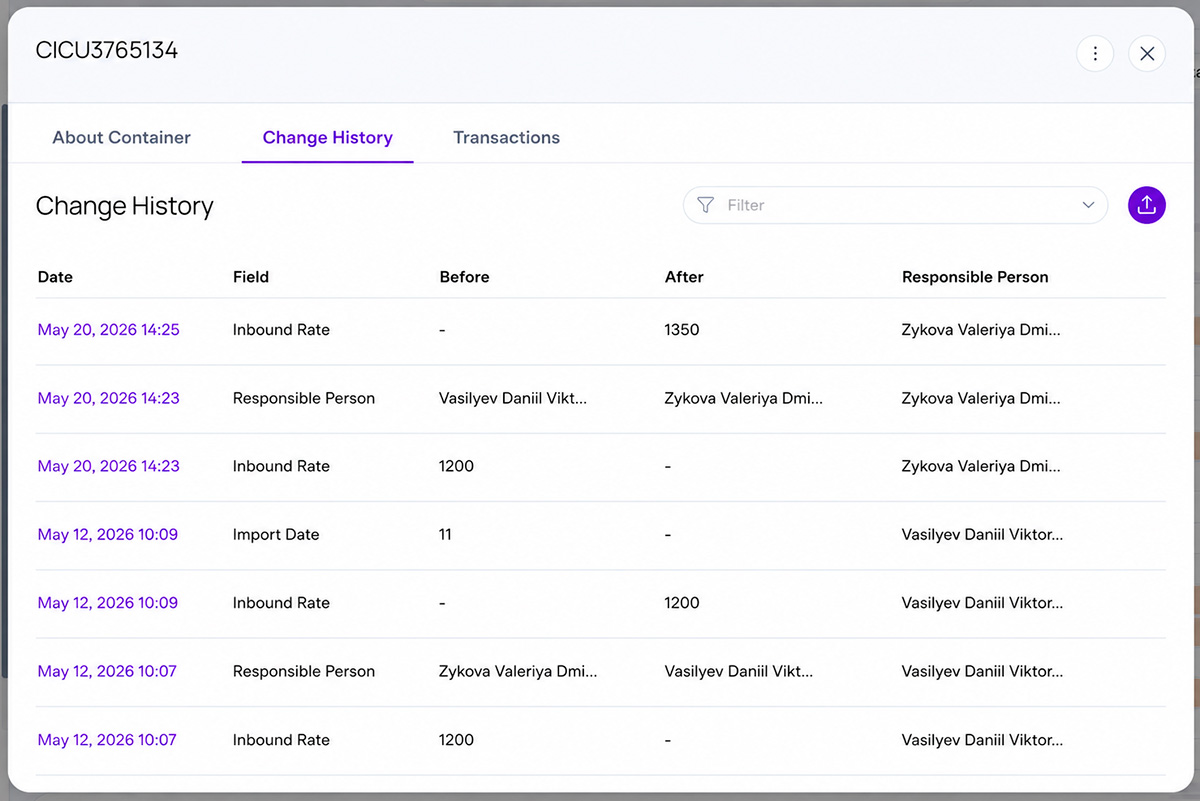
Change History: Complete Audit Trail
The Change History is one of Uley’s core features for operational control and auditing.
Every modification made to a container or deal is automatically recorded.
Example
20 May 2026
● V. D. Zykova changed the incoming terminal rate from 1,200 to 1,350.
12 May 2026
● D. V. Vasilyev added a terminal rate of 1,200 and assigned the responsible employee.
This provides complete transparency and accountability across your organization.
Deal Registry: Manage Sales and Leasing in One Place
Uley includes a centralized Deal Registry, allowing users to manage both container sales and leasing operations.
Deals can be filtered by:
● Deal type
● Status
● City
● Responsible manager
This makes finding any transaction fast and effortless.
Deal Card
Each deal contains several dedicated tabs:
● Container Data
● Invoices
● Additional Expenses
The container table displays:
● Container number
● Container type
● Quantity
● Customer rate
● Pickup date
● Return date
The system automatically calculates financial totals for every deal.
By linking containers and deals, Uley provides a complete financial overview without requiring multiple accounting systems.
Multilingual Interface
Uley supports three interface languages:
● English
● Chinese
● Russian
Users can switch languages at any time in their account settings.
How to Start Managing Your Container Fleet in Uley
Step 1
Open the Containers section.
Step 2
Customize the displayed columns by adding or removing fields.
Step 3
Apply multiple filters.
For example, to display only unpaid containers located at the Novaya Pyshma terminal:
● Payment Status = Unpaid
● Terminal = Novaya Pyshma
Step 4
Open the container profile, review the Change History, and extend the booking if necessary.
Step 5
Create a new deal, add containers, and let Uley automatically calculate the transaction total.
How Uley Benefits Container Businesses
1. Complete Operational Transparency
Every action is recorded.
You’ll always know:
● Who changed a rate
● When a status was updated
● Who reassigned responsibility
No edits are ever lost.
2. Faster Decision-Making
Stop searching through spreadsheets and chat messages.
All operational and financial information is available in one centralized system.
3. Better Business Control
Monitor not only your container fleet but also:
● Responsible employees
● Booking history
● Deal conditions
● Financial status
Everything is fully traceable.
4. Flexible Configuration
Uley adapts to your business processes—not the other way around.
You can customize:
● Visible columns
● Filters
● Custom attributes
● Business-specific workflows
The system is designed around your company’s operational requirements.
Built for Companies of Any Size
Uley is suitable for both small container operators and enterprises managing hundreds or thousands of containers.
By eliminating idle containers, incorrect pricing, and lost deals, Uley helps reduce operational costs while improving fleet utilization and financial performance.
Request a Demo
Want to see how Uley can optimize your container fleet?
Request a personalized demo today.
*Uley - a product from Lemnos, which is a partner of My Way Shipping
*The information on this page does not constitute a public offer.